Background
What is Terraform
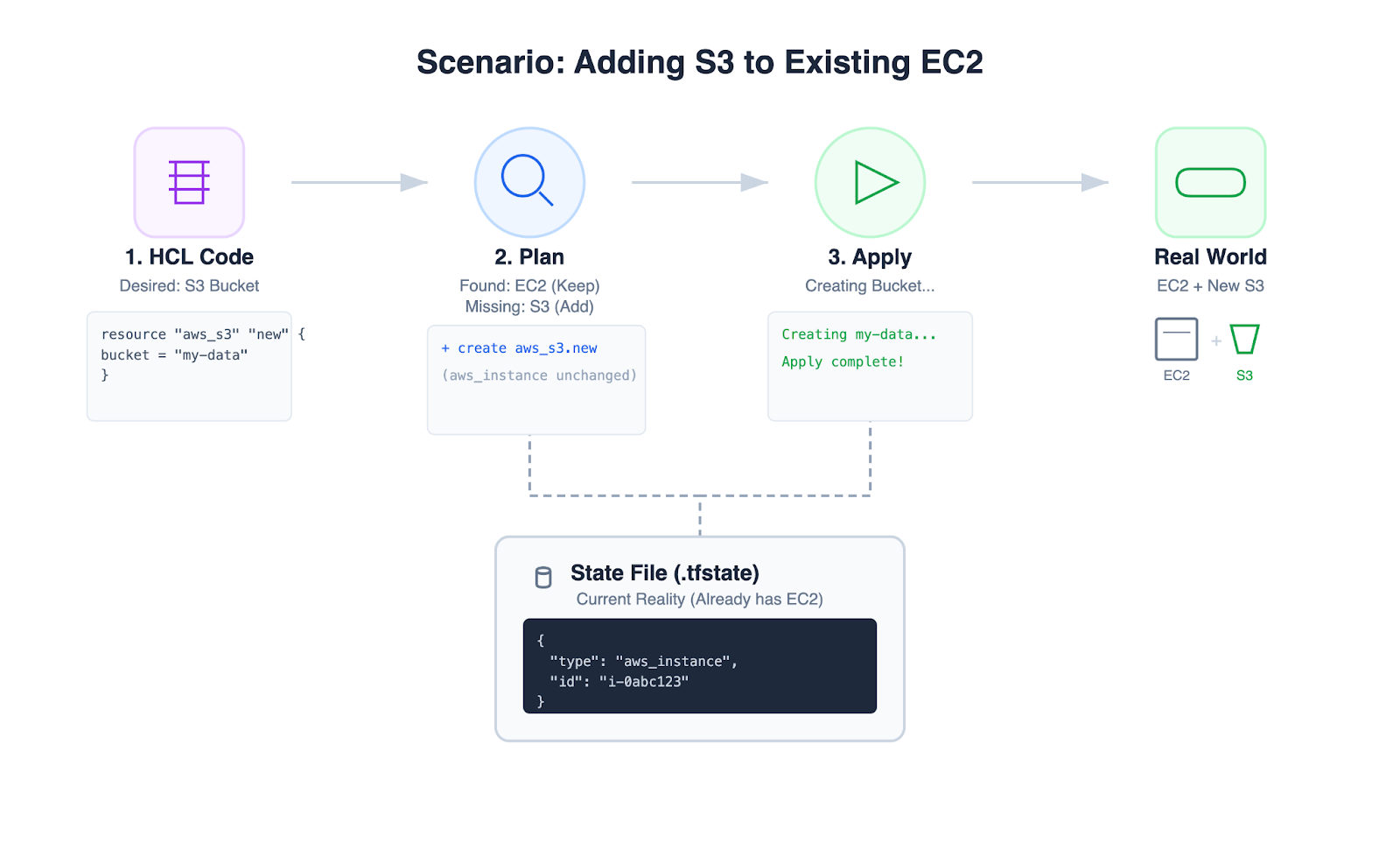
Terraform shifts infrastructure management away from manual console operations and toward declarative configuration (HCL, the HashiCorp Configuration Language).
Management workflow (plan and apply)
- Plan: Terraform compares the desired configuration with the current reality (state) and produces an execution plan (create/modify/delete) for review.
- Apply: Terraform executes the approved plan to move infrastructure from the current state to the desired state.
Provider ecosystem
Providers make Terraform flexible: they allow a consistent workflow across different APIs and environments (AWS, GCP, Azure, etc.).
AWS S3 storage classes (for lifecycle policies)
The following table compares the key storage classes used in S3 Lifecycle policies. Prices are based on the US East (N. Virginia) region and are subject to change.
| Storage Class | Designed For (Use Case) | Availability Zones | Min Storage Duration | Storage Cost ($/GB/mo) | Retrieval Cost / Time |
|---|---|---|---|---|---|
| S3 Standard | Active data: frequently accessed files, content distribution, dynamic websites. | ≥ 3 | None | $0.023 | Free (Instant) |
| S3 Intelligent-Tiering | Unknown patterns: data with changing access needs; moves data automatically. | ≥ 3 | None* | Tiered (Freq: $0.023, Infreq: $0.0125) | Free (Instant) |
| S3 Standard-IA | Infrequent access: long-lived data accessed less than once a month but needed instantly. | ≥ 3 | 30 days | $0.0125 | $0.01 / GB (Instant) |
| S3 One Zone-IA | Re-creatable Data: Secondary backups or data you can regenerate if the AZ fails. | 1 | 30 Days | $0.0100 | $0.01 / GB (Instant) |
| S3 Glacier Instant Retrieval | Archive (Fast): Medical records or news footage that is rarely accessed but needs to be seen now. | ≥ 3 | 90 Days | $0.0040 | $0.03 / GB (Instant) |
| S3 Glacier Flexible Retrieval | Archive (Backup): Traditional backups where waiting minutes or hours is acceptable. | ≥ 3 | 90 Days | $0.0036 | Free (Bulk) or $$ (Std) (1 min - 12 hrs) |
| S3 Glacier Deep Archive | Cold Archive: Compliance retention (e.g., tax/legal records for 7-10 years). | ≥ 3 | 180 Days | $0.00099 | $0.02 / GB (12 - 48 hrs) |
Key takeaways
- The retrieval trap: Glacier Instant Retrieval storage ($0.0040) is cheap, but retrieval ($0.03/GB) can exceed a month of S3 Standard storage. Use it only when reads are rare.
- The one-zone risk: S3 One Zone-IA is ~20% cheaper than Standard-IA, but because it lives in only 1 AZ, you can lose data if that AZ has an outage. Never use it for master copies.
- Deep Archive Savings: Deep Archive is roughly 1/23rd the price of S3 Standard. It is the most cost-effective way to store data you effectively never expect to read again.
Note: Intelligent-Tiering has no minimum duration for the storage itself, but objects smaller than 128KB are kept at the Frequent Access tier rate.
Investigation
Issue
- Reference: https://github.com/hashicorp/terraform-provider-aws/issues/25939
- Symptom: timeouts when applying an S3 lifecycle configuration via Terraform.
Root Cause Analysis
Consistency Model in AWS S3
The root cause is that AWS S3 is strongly consistent for object reads/writes (data plane), but bucket configuration changes (control plane) are eventually consistent.
Data plane: strong consistency
Since December 2020, Amazon S3 provides strong read-after-write consistency for PUTs and DELETEs of objects in all AWS Regions.
- Scenario: You write
image.jpg. You immediately callLISTobjects. - Result: S3 guarantees image.jpg will appear in the list. You do not need to wait for propagation.
Control plane: eventual consistency
The “Control Plane” manages the container (the bucket) and its rules. These operations are not instantaneous across the massive distributed system.
- Scenario: You delete a bucket named
my-test-bucket, then immediately try to recreate the bucket with the same name.- Result: it might fail with
BucketAlreadyExistsorOperationAbortedbecause the deletion hasn’t propagated to the node handling the create request.
- Result: it might fail with
- Scenario: You apply a bucket policy to block public access.
- Result: it may take a short time for that policy to be enforced on every request entering the system.
| Feature | Action | Propagation Model | Consistency Model |
|---|---|---|---|
| Object Upload | Putting a file (my-photo.jpg) | Synchronous Replication: The data is physically copied to ≥3 AZs before you get a success message. | Strong Consistency (Read-after-Write) |
| Bucket Creation | Creating a bucket (my-bucket) | Metadata Update: This is a logical entry in the S3 region’s directory. It is durable but distributed via a gossiping or eventual protocol. | Eventual Consistency (May not be visible instantly) |
| Lifecycle Config | Adding a rule (Move to Glacier) | Metadata Update + Async Execution: The rule is saved instantly to the metadata, but the action is performed by a background scanner. | Eventual Consistency (Rule applies over time) |
How Terraform handles it
This timeout issue in Terraform S3 lifecycle configuration is a textbook example of friction between infrastructure-as-code tools and eventual consistency.
While S3 lifecycle configuration metadata is replicated across the control plane fleet to ensure durability, replication is not instantaneous. This propagation delay introduces two distinct challenges for tools like Terraform.
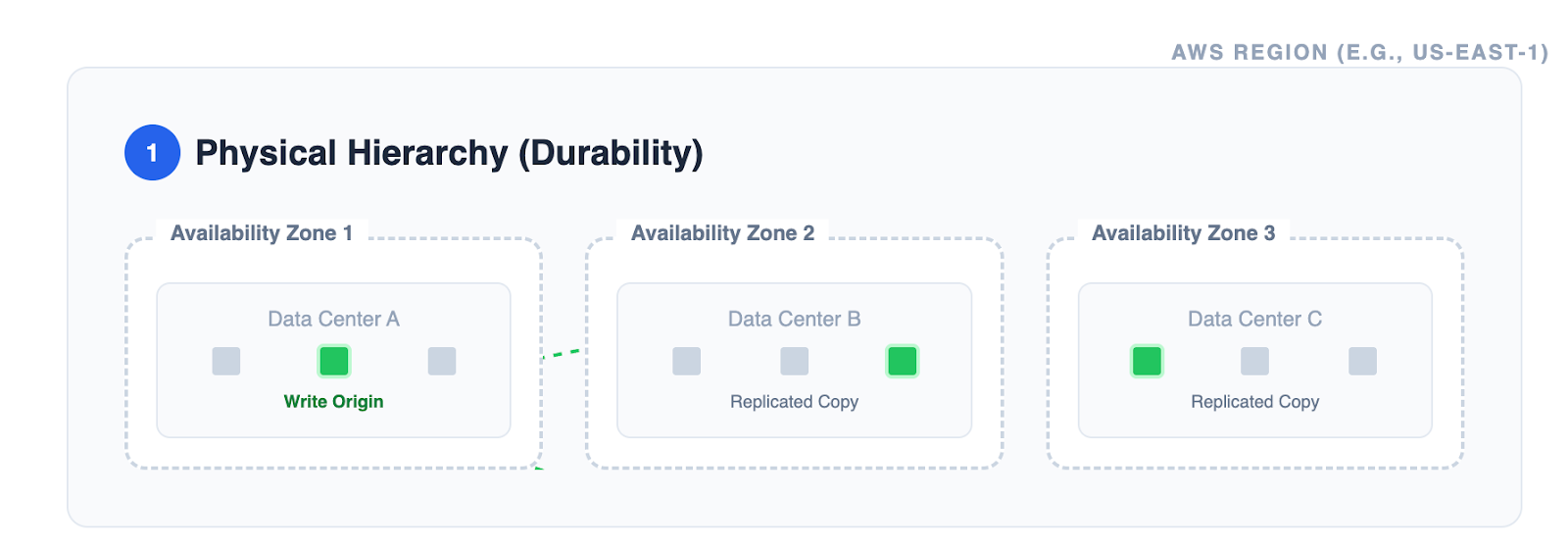
Problem 1: Stale reads
Immediately after a write, a read request may return old data. This forces a difficult choice: sleep longer (introducing high latency) or poll frequently (creating high API load).
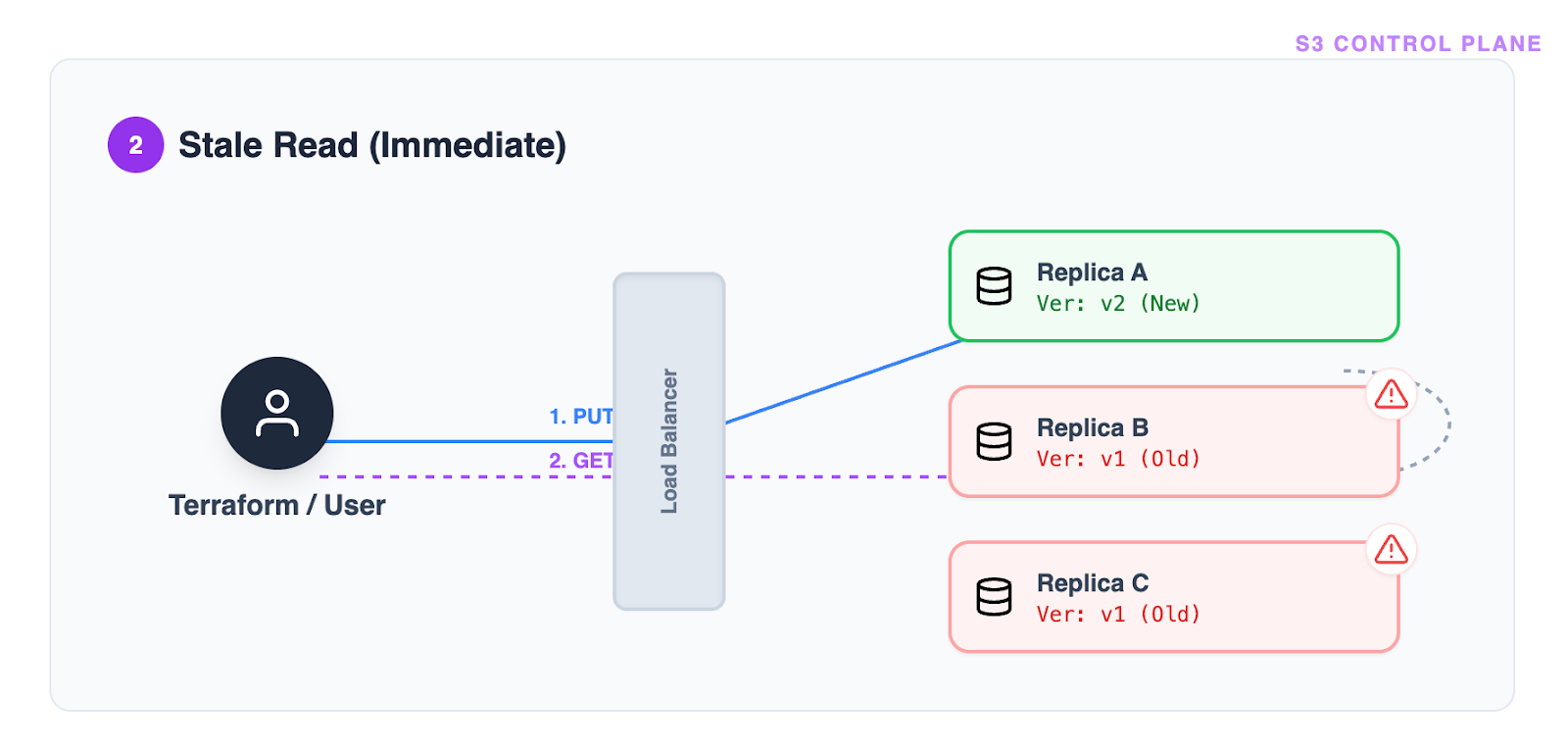
Terraform’s Approach: The current S3 waiter implementation relies on a fixed polling interval (a “magic number,” typically 5 seconds).
Problem 2: Flapping consistency
In a distributed system, a single “Success” response is not a guarantee of permanent convergence. A subsequent request might be routed to a different, lagging replica, causing the state to “flap” between configured and unconfigured.
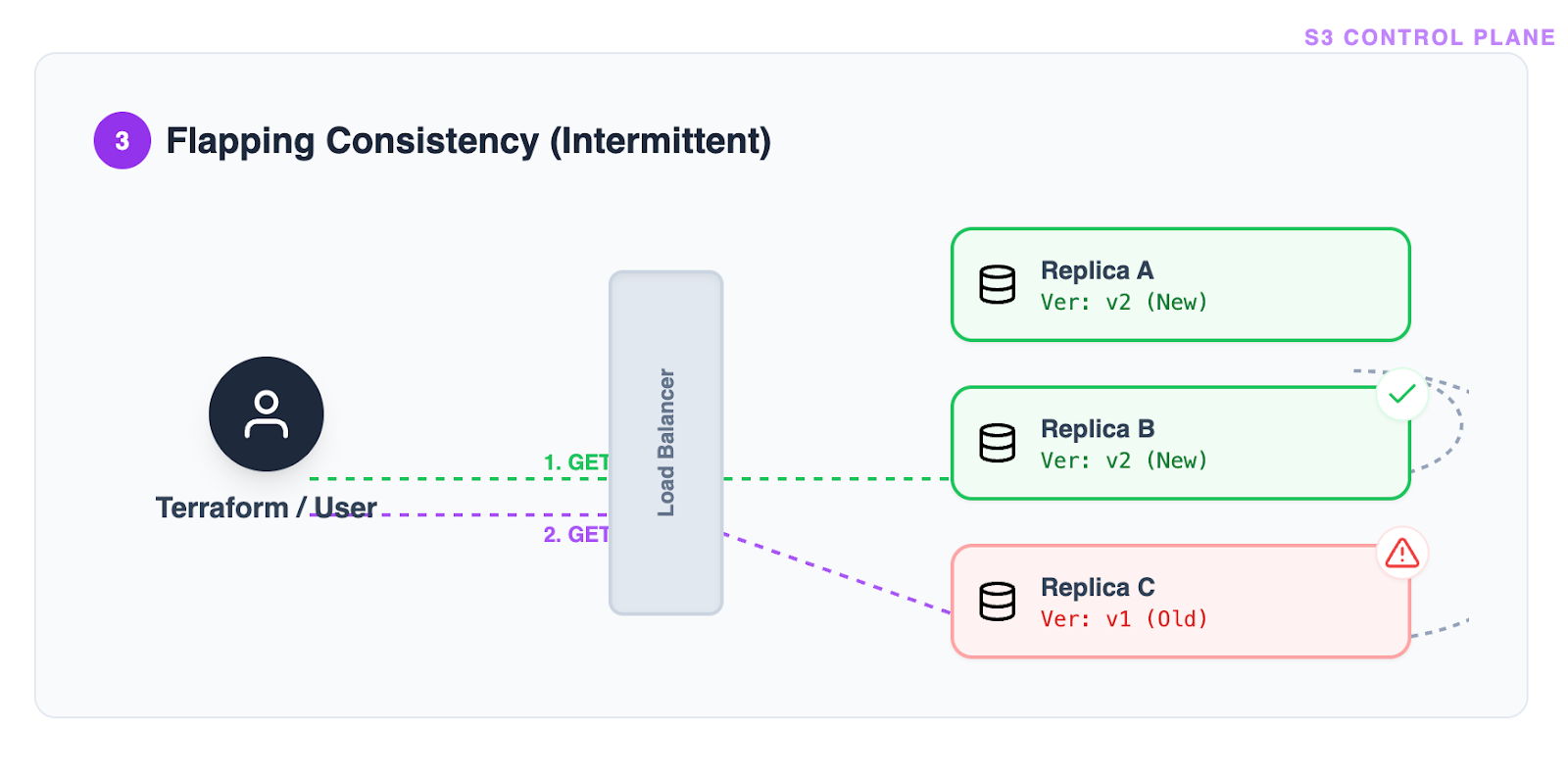
Terraform’s Approach: To mitigate flapping, the waiter implements a “stability check.” It does not accept a single success; it requires the success state to be observed consistently across consecutive checks (10 times in a row).
The root cause of timeouts
The fundamental flaw in this waiter logic is that it is inefficient for the “happy path” (wasting verification time when the system is already consistent) yet too rigid for the “tail latency path” (failing to adapt when AWS propagation is slower than usual). This rigidity is the primary driver behind the s3_lifecycle_configuration timeout errors.
Verification of Consistency Model on AWS S3
This section details the empirical verification of the AWS S3 consistency model, building upon the previous investigation. We utilized two Python test suites to validate the consistency guarantees for both the Data Plane and the Control Plane.
Test Suite Overview
The verification process involved:
- Sequential test (
test_s3_consistency.py): baseline measurements with serial operations to establish ground truth. - Concurrent test (
test_s3_consistency_concurrent.py): stress testing with parallel threads to observe behavior under high-concurrency scenarios (thundering herd).
Data Plane Verification (Object Consistency)
- Objective: Verify that a GET request immediately following a PUT request returns the latest data.
- Method:
- Generate a unique key and body.
- Perform
put_object. - Immediately perform
get_objectand verify the content matches. - Measure latency and success rate.
- Concurrent Scenario: 100 parallel threads performing atomic write-then-read operations.
Control Plane Verification (Eventual Consistency)
- Objective: Measure the propagation delay of bucket configuration changes.
- Method:
- Update the bucket’s lifecycle configuration using
put_bucket_lifecycle_configuration. - Poll
get_bucket_lifecycle_configurationuntil the new configuration is visible. - Measure the time (propagation delay) between the PUT and the successful GET matching the new config.
- Update the bucket’s lifecycle configuration using
- Concurrent “Racer” Scenario: A “Writer” thread updates the config while a “Poller” thread aggressively polls for the change, using exponential backoff to measure propagation time with high precision.
Verification Results
The following results are based on the execution of the test suites (N=100 iterations for each test).
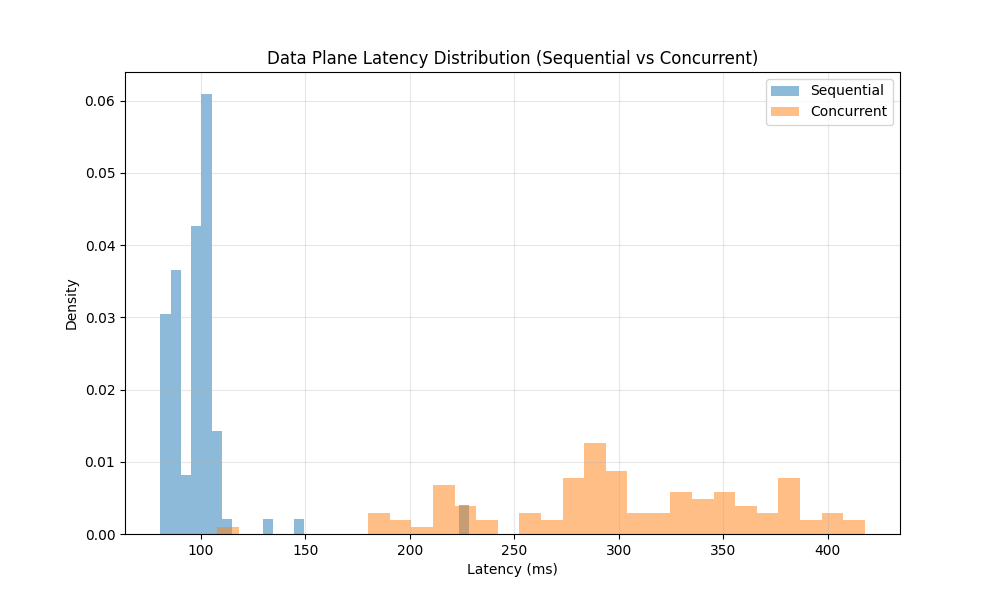
Data Plane (Strong Consistency)
| Metric | Sequential Test | Concurrent Test |
|---|---|---|
| Success Rate | 100.00% | 100.00% |
| Mean Latency | 99.26 ms | 302.38 ms |
| P99 Latency | 225.72 ms | 414.45 ms |
Observation:
The Data Plane demonstrated Strong Consistency. In 100% of the cases, the GET request immediately following the PUT returned the correct object. Even under concurrent load, while latency increased, consistency was maintained.
Control Plane (Eventual Consistency)
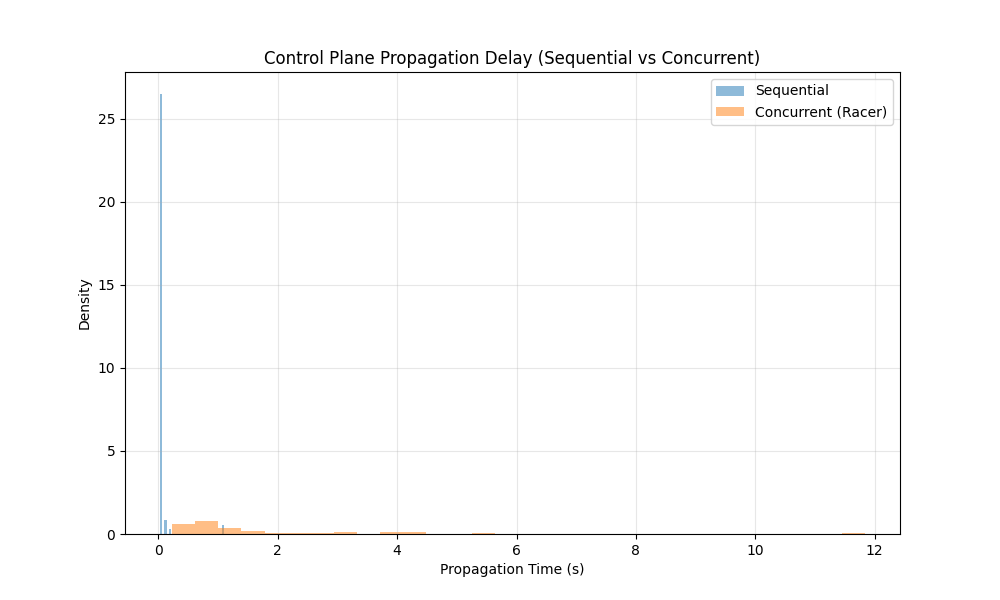
| Metric | Sequential Test | Concurrent “Racer” Test |
|---|---|---|
| Success Rate | 100.00% | 100.00% |
| Mean Propagation | 0.07 s | 1.85 s |
| Max Propagation | 1.09 s | 11.83 s |
| Instant Visibility (<1s) | 98.0% | 52.0% |
Observation:
The Control Plane demonstrated Eventual Consistency.
- In the Sequential test, changes were often visible almost immediately (Mean: 0.07s), but occasional delays were observed.
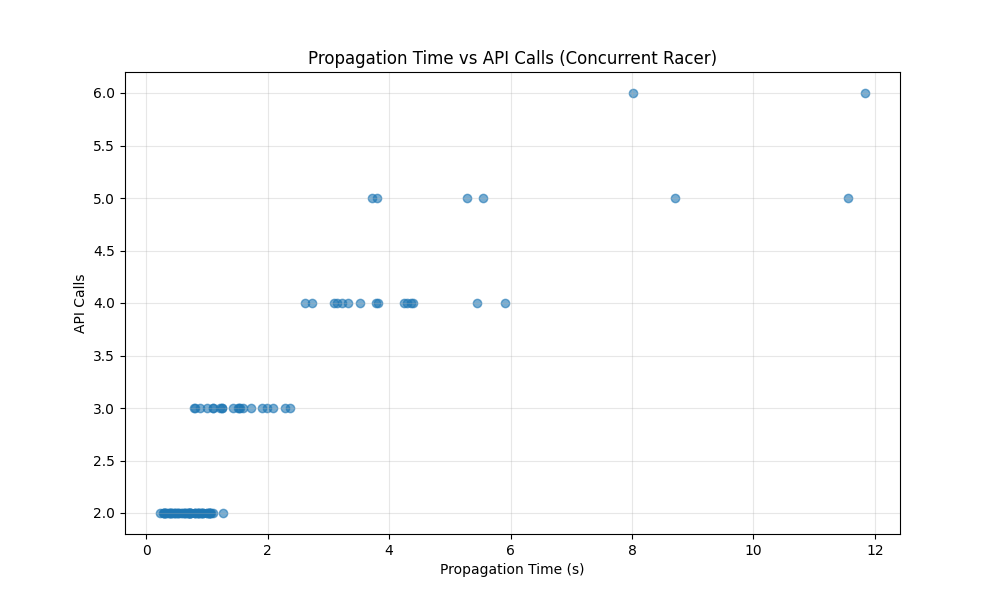
- In the Concurrent test, the eventual nature became much more apparent. The mean propagation time increased to 1.85s, with a worst-case delay of 11.83s.
- Only 52% of concurrent updates were instantly visible, confirming that control plane operations are not strongly consistent.
Additional control plane insights
The following charts detail the tail latency and the relationship between API calls and propagation time during the concurrent “Racer” test.
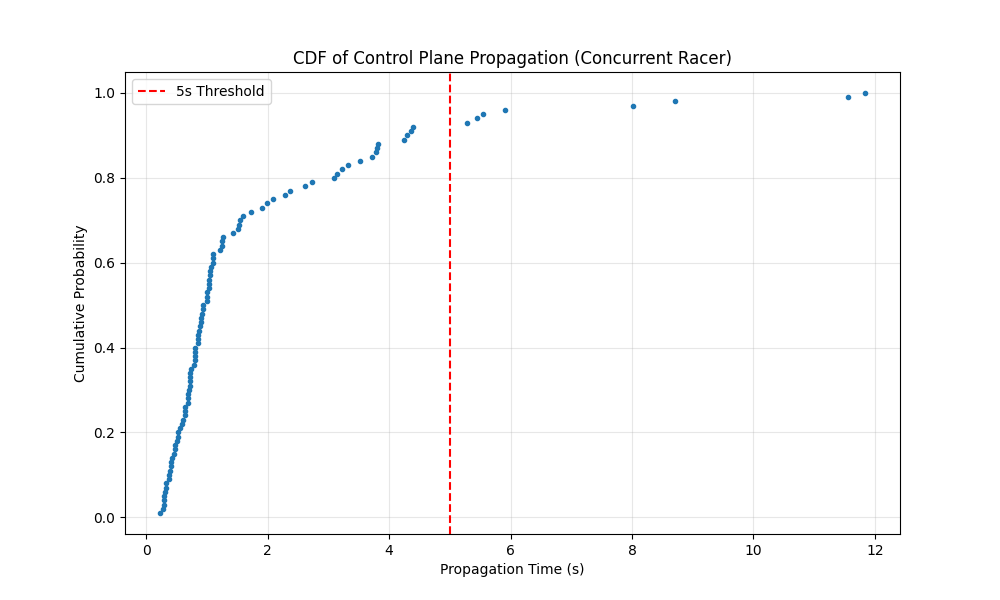
CDF of propagation time
Conclusion
The empirical evidence supports the AWS S3 consistency model documentation:
- S3 Objects (Data Plane) exhibit Strong Consistency. Applications can rely on reading the latest data immediately after a write.
- S3 Bucket Configurations (Control Plane) exhibit Eventual Consistency. Changes to bucket policies (like Lifecycle rules) may take seconds or even longer to propagate across the system. Applications must be designed to tolerate these delays and should not assume immediate visibility of configuration changes.
Optimization
Part 1: Why AWS Learner Lab Cannot Reproduce the Timeout Issue
The problem: two different AWS environments
AWS Production Environment (Real World):
- Massive distributed system spanning multiple data centers
- Configuration changes must propagate across countless nodes
- Eventual consistency: changes take time to become visible everywhere
- Propagation delays range from seconds to minutes (heavy-tailed distribution)
AWS Learner Lab Environment (Our Testing Environment):
- Simplified educational environment
- Smaller scale, fewer nodes
- Configuration changes propagate almost instantly (< 1 second typically)
- Cannot reproduce real-world propagation delays
Why this matters
When you run the baseline test in Learner Lab without simulation:
PUT request → returns in ~0.5s
First GET check (3s later) → configuration already visible ✓
Result: success in ~3 seconds, every single time
But in production (based on GitHub Issue #25939 real data):
- 50% of requests take up to 48 seconds to propagate
- 95% of requests take up to 156 seconds to propagate
- 1% of requests take up to 312 seconds to propagate
The current Terraform timeout of 180 seconds means:
- ✓ Covers approximately 95% of cases (P95 = 156s)
- ✗ Fails approximately 5% of the time when propagation exceeds 180s
- This causes deployment failures in production!
Part 2: Understanding Percentiles (P50, P90, P95, P99)
What are percentiles?
Think of percentiles as answering: “How long do I need to wait to cover X% of all cases?”
Simple Example with 100 students’ test scores:
- P50 (50th percentile/median): 50% scored below this, 50% above
- P90 (90th percentile): 90% scored below this, only 10% scored higher
- P95 (95th percentile): 95% scored below this, only 5% scored higher
Applied to AWS S3 Propagation Times
From GitHub Issue #25939 real production data:
| Percentile | Time | Meaning |
|---|---|---|
| P50 | 48 seconds | 50% of requests propagate within 48s |
| P75 | 82 seconds | 75% of requests propagate within 82s |
| P90 | 142 seconds | 90% of requests propagate within 142s |
| P95 | 156 seconds | 95% of requests propagate within 156s |
| P99 | 234 seconds | 99% of requests propagate within 234s |
| Max | 312 seconds | Worst case observed |
Visual Distribution:
Fast cases (P0-P50):     ████████████░░░░░░░░  0-48s    (50% of requests)
Moderate (P50-P90):      ████████░░░░░░░░░░░░  48-142s  (40% of requests)
Slow (P90-P95):          ██░░░░░░░░░░░░░░░░░░  142-156s (5% of requests)
Very slow (P95-P99):     █░░░░░░░░░░░░░░░░░░░  156-234s (4% of requests)
Extreme (P99-Max):       ░░░░░░░░░░░░░░░░░░░░  234-312s (1% of requests)
Why This Is Called “Heavy-Tailed”
Most requests are fast (median = 48s), but the tail of slow requests extends much longer:
- P99 (234s) is 4.9 times longer than P50 (48s)
- This is why fixed timeouts fail—they cannot accommodate the unpredictable slow cases
Part 3: The Simulation Solution
How we simulate real production behavior
Since Learner Lab propagates instantly, we inject artificial delays that match the real production distribution:
def _generate_propagation_delay(self):
    """
    Generate realistic propagation delay based on percentile distribution.
    """
    rand = random.random()  # Random number 0.0 to 1.0

    if rand < 0.50:
        # 50% of requests: P0-P50 (0-48 seconds)
        return random.uniform(0, 48)
    if rand < 0.75:
        # Next 25% of requests: P50-P75 (48-82 seconds)
        return random.uniform(48, 82)
    if rand < 0.90:
        # Next 15% of requests: P75-P90 (82-142 seconds)
        return random.uniform(82, 142)
    if rand < 0.95:
        # Next 5% of requests: P90-P95 (142-156 seconds)
        return random.uniform(142, 156)
    if rand < 0.99:
        # Next 4% of requests: P95-P99 (156-234 seconds)
        return random.uniform(156, 234)

    # Rare 1% of requests: P99-Max (234-312 seconds)
    return random.uniform(234, 312)
How the simulation works (step-by-step)
Without Simulation (Learner Lab default):
PUT request → 200 OK (0.5s)
    ↓
GET check #1 (at 3s) → configuration visible ✓
    ↓
SUCCESS (total time: ~3s)
With Simulation (mimicking production):
PUT request → 200 OK (0.5s)
    ↓
Generate simulated delay: 156s [this would happen in production]
    ↓
GET check #1 (at 3s) → simulated: still propagating ✗
GET check #2 (at 6s) → simulated: still propagating ✗
GET check #3 (at 9s) → simulated: still propagating ✗
    ...
GET check #52 (at 156s) → simulated: NOW visible ✓
    ↓
SUCCESS (total time: ~156s)
Key Implementation Detail
def check_configuration_match(self, expected_config):
    """Override to simulate eventual consistency."""

    # First check: generate the delay for this test.
    if not hasattr(self, "_simulated_delay"):
        self._simulated_delay = self._generate_propagation_delay()
        self._propagation_start = time.time()
        print(f" [Sim: {self._simulated_delay:.1f}s]", end="")

    # Check if enough time has passed.
    elapsed = time.time() - self._propagation_start
    if elapsed >= self._simulated_delay:
        # Propagation "complete" - do real AWS check.
        return super().check_configuration_match(expected_config)

    # Still "propagating".
    return False
What this does:
- On first check, generate a random delay (e.g., 156s) matching production distribution
- Keep returning
False(not ready) until that much time has actually elapsed - Only then allow the real AWS check to succeed
This creates realistic test conditions that match production behavior!
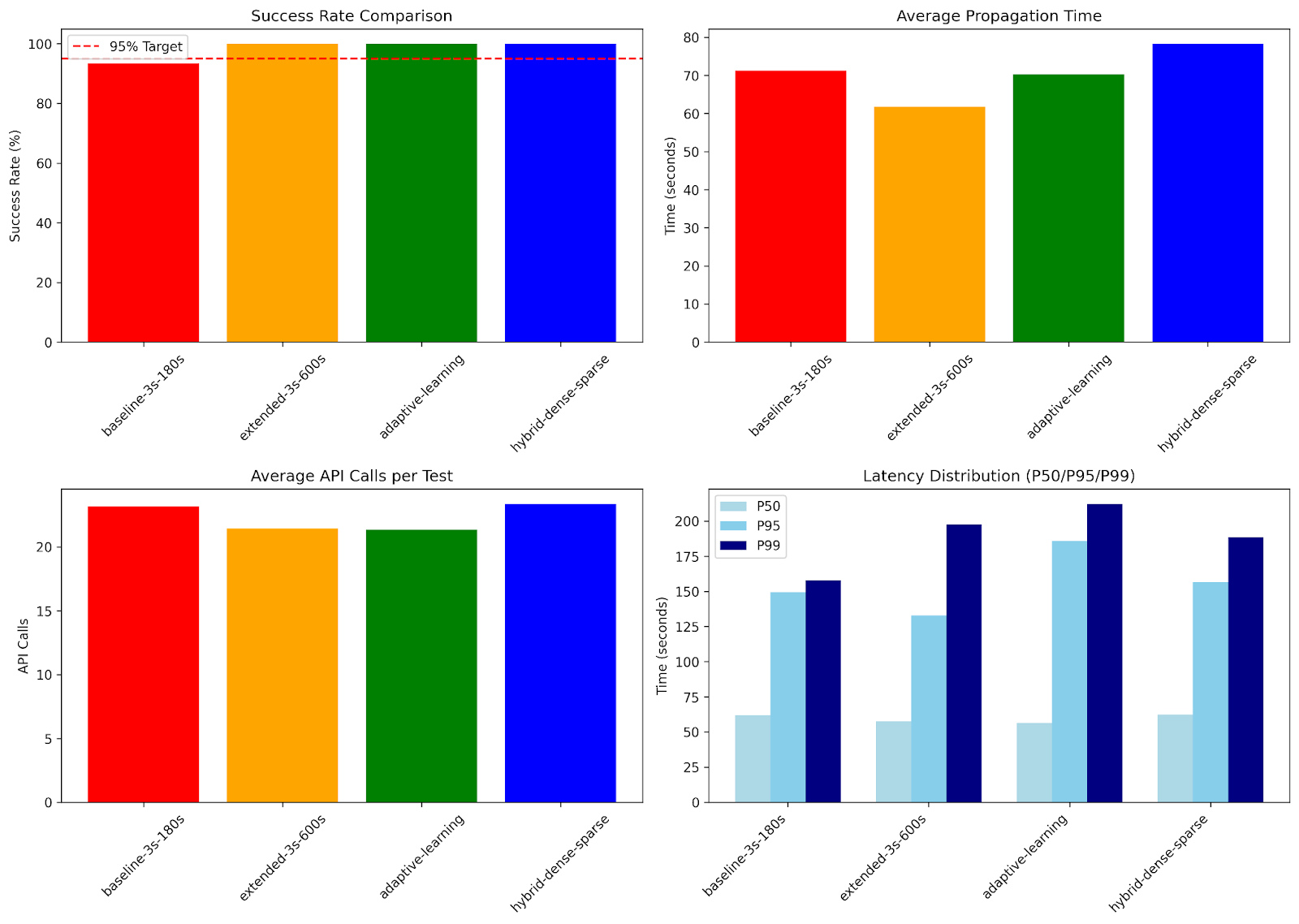
Part 4: Test Design - Four Strategy Comparison
Strategy 2.1: Baseline (current Terraform)
Configuration:
- Polling interval: Every 3 seconds (fixed)
- Timeout: 180 seconds
Behavior:
- Checks 60 times (180s ÷ 3s = 60 checks)
- Coverage: P95 (156s < 180s)
- Expected failures: approximately 5% (cases taking > 180s)
Theoretical analysis with simulation:
- Cases under 180s: Success ✓
- Cases over 180s (5% of requests): Timeout failure ✗
Strategy 2.2: Extended timeout
Configuration:
- Polling interval: Every 3 seconds (fixed)
- Timeout: 600 seconds (10 minutes)
Behavior:
- Checks 200 times (600s ÷ 3s = 200 checks)
- Coverage: Beyond P99 (234s < 600s, even Max 312s < 600s)
- Expected failures: <1%
Trade-offs:
- ✓ Higher success rate
- ✗ No API call reduction - still checking every 3s
- ✗ Wastes time on genuine failures (waits full 10 minutes)
Strategy 2.3: Adaptive learning (improved)
Configuration:
- Polling interval: Variable (2-15s, adjusts based on elapsed time)
- 0-30s: Every 2 seconds (dense early)
- 30-60s: Every 4 seconds
- 60-120s: Every 8 seconds
- 120-180s: Every 10 seconds
- 180s+: Every 15 seconds (sparse late)
- Timeout: Dynamic (300-600s, learned from past 20 tests)
Innovation: learns from experience
# After each successful test, remember how long it took.
self.historical_times.append(result["propagation_time"])

# Calculate timeout as: mean + 3 standard deviations.
timeout = mean(historical_times) + 3 * stdev(historical_times)
Why this works:
- Higher minimum (300s vs 180s): Covers P90 (142s) during bootstrap, reducing early failures
- 3×stdev vs 2×stdev: Covers 99.7% of distribution instead of 95%, handles tail latency better
- Faster learning (3 tests vs 5): Enters adaptive mode sooner while still being conservative
- Adaptive intervals (2-15s): Dense early polling for common cases (P50), sparse late for tail (P99)
Adaptation examples:
- If recent tests averaged 50s: Sets timeout ≈ 200-250s (covers typical patterns + buffer)
- If recent tests averaged 150s: Sets timeout ≈ 450-500s (adapts to slower periods)
- Continuously adjusts to changing AWS behavior patterns
Strategy 2.4: Hybrid polling
Configuration:
| Time Range | Polling Interval | Rationale |
|---|---|---|
| 0-30s | 2 seconds | Most requests complete quickly |
| 30-60s | 4 seconds | Moderate cases |
| 60-120s | 8 seconds | Less common |
| 120-600s | 15 seconds | Rare tail cases |
Inspiration: “The Tail at Scale” (Jeff Dean)
- Dense early polling captures the common case (P50 @ 48s)
- Sparse late polling handles rare slow cases without excessive API calls
Example with P95 case (156s propagation):
Baseline strategy (3s fixed):
Total checks: 52 times (156s ÷ 3s)
Hybrid strategy (variable):
0-30s: 15 checks (30s ÷ 2s)
30-60s: 7 checks (30s ÷ 4s)
60-120s: 7 checks (60s ÷ 8s)
120-156s: 2 checks (36s ÷ 15s)
Total: 31 checks
API call reduction: 40% fewer calls! (31 vs 52)
Part 5: What We’re Measuring
Primary Metrics
1. Success rate
success_rate = (successful_tests / total_tests) * 100%
Goal: >95% (at least P95 coverage)
2. Propagation time distribution
From successful tests, calculate:
- P50 = median propagation time
- P90 = 90th percentile
- P95 = 95th percentile
- P99 = 99th percentile
3. API call efficiency
Total API calls = 1 (PUT) + number_of_get_checks
Average per test = mean(api_calls)
Why We Run 30 Iterations Per Strategy
- Statistical validity: 30 samples provide reliable percentile estimates
- Distribution coverage: With 30 tests, we expect:
- Approximately 15 tests in P0-P50 range (fast)
- Approximately 12 tests in P50-P90 range (moderate)
- Approximately 3 tests in P90-P99 range (slow)
- Approximately 0-1 tests in P99+ range (very slow)
This gives us comprehensive data across the entire distribution!
Summary: The Complete Picture
The Challenge:
- AWS Learner Lab cannot reproduce real production propagation delays
- Real production shows heavy-tailed latency (P99 is 5 times longer than P50)
Our Solution:
- Inject simulated delays matching empirical production distribution
- Test four different waiter strategies under realistic conditions
Expected Outcomes:
- Baseline: Approximately 95% success, but 60 API calls per test
- Extended: Approximately 99%+ success, but still 200 API calls (wasteful)
- Adaptive: Approximately 95%+ success, learns optimal timeout
- Hybrid: Approximately 99%+ success, 40% fewer API calls (best of both worlds)
This research demonstrates that smart polling strategies can simultaneously improve success rates AND reduce API costs!